使用 bHaptics Player for PC,可自定义 TactGlove 的 LED 指示灯颜色。如果看不到 LED Color 选项,请确认是否使用最新版本的 bHaptics Player,必要时更新。
自定义 LED 颜色:
- 打开 bHaptics Player for PC,配对 TactGlove。
- 进入 Device 标签页。
- 在右侧点击 LED Color
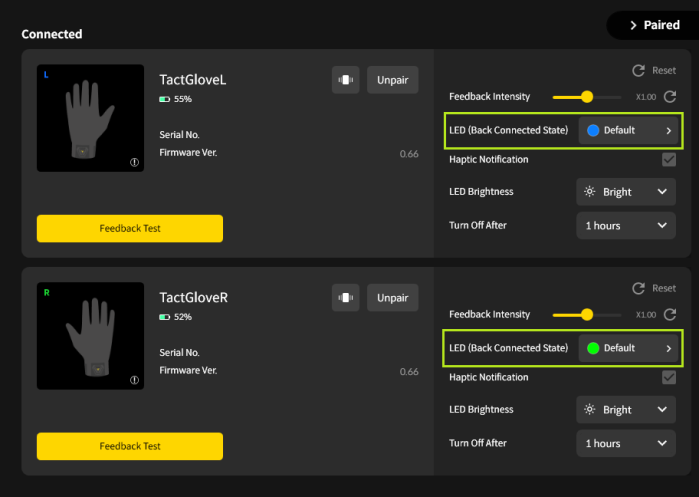
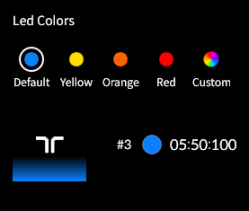
- 在 LED Color 窗口中,您可以:
- 选择预设颜色,即时应用。
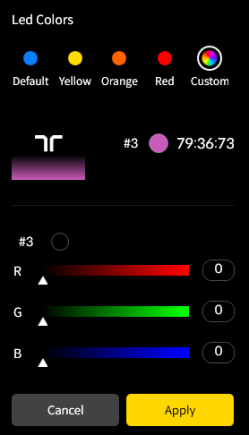
- 选择 Custom,用滑块或输入 RGB 值调节颜色。然后点击 Apply 应用更改。
- 选择预设颜色,即时应用。
- 所选颜色会立即应用到设备。
这篇文章有帮助吗?
很好!
感谢您的反馈。
抱歉我们没能带来帮助
感谢您的反馈。
反馈已发送
感谢,我们将试着改善此文档。
Still have problems?
If you couldn’t find what you were looking for, feel free to contact our support team.