Turning On
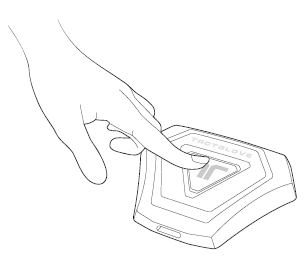
To turn on the TactGlove, press and hold the power button on the Main Controller for 2 seconds. The device will vibrate briefly, and the LED indicator will blink blue to confirm that it has entered Bluetooth pairing mode.
Turning Off
You can turn off the TactGlove manually or let it power down automatically.
Turn Off Manually
Press and hold the power button for 3 seconds. The LED lights will switch off, and the device will shut down.
Turn Off Automatically
After 3 minutes in pairing mode
If the device is left in pairing mode without connecting, it will automatically power off after 3 minutes.
When “Turn Off After” is enabled
If you’ve enabled the Turn Off After setting in Device > Connected Settings, the TactGlove will automatically power off after the set period of inactivity.
Was this article helpful?
That’s Great!
Thank you for your feedback
Sorry! We couldn't be helpful
Thank you for your feedback
Feedback sent
We appreciate your effort and will try to fix the article
Still have problems?
If you couldn’t find what you were looking for, feel free to contact our support team.