为防止游戏中意外关机,可锁定 TactSuit Pro 的前置电源按钮。后置电源按钮仍可正常工作。开启 Button Lock 选项后,在解除锁定前前置按钮不会响应。
在 Windows PC 上锁定
打开 PC 版 bHaptics Player,配对 TactSuit Pro。
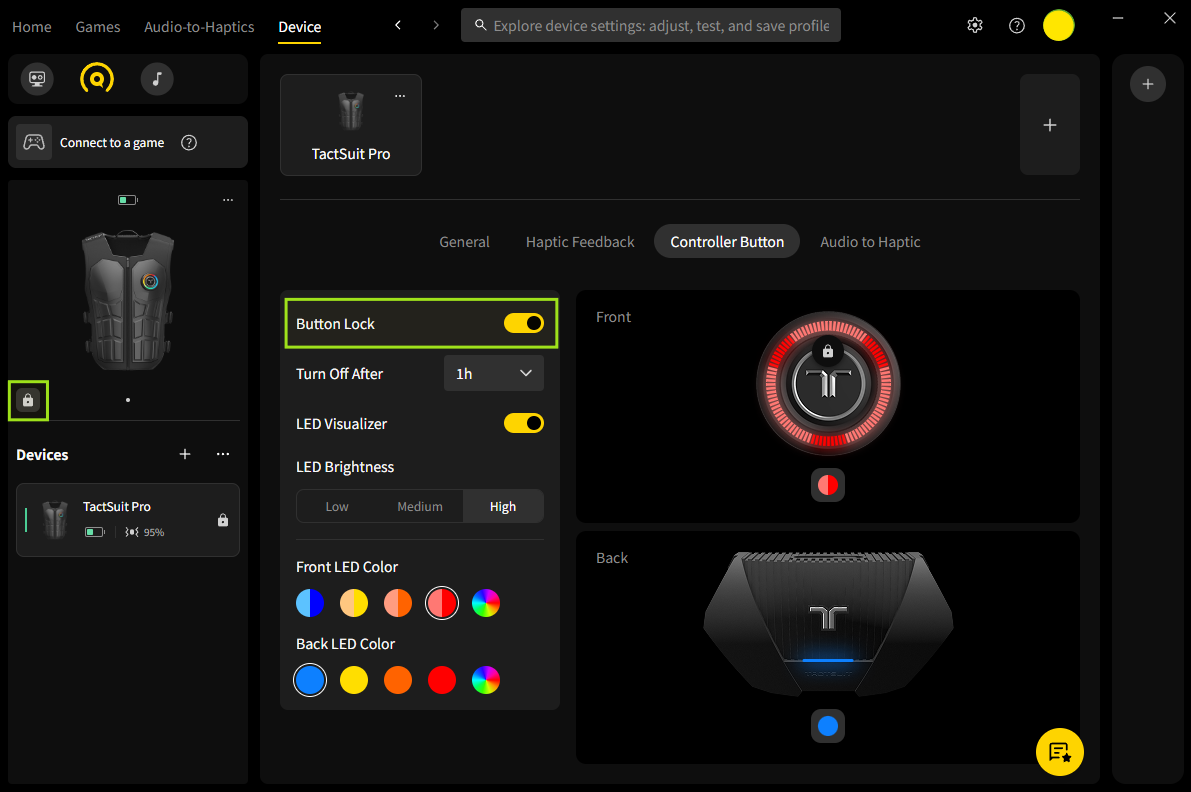
进入 Device 标签页,选择 Controller Button
打开 Button Lock 开关。
锁定后,设备图标旁会出现锁定图标。
要解除锁定,可点击 Device 面板的 锁定图标,或在 Controller Button 设置中关闭开关。前置电源按钮便恢复正常工作。
这篇文章有帮助吗?
很好!
感谢您的反馈。
抱歉我们没能带来帮助
感谢您的反馈。
反馈已发送
感谢,我们将试着改善此文档。
Still have problems?
If you couldn’t find what you were looking for, feel free to contact our support team.