The TactSuit Pro is designed with adjustable sizing and length features to ensure a comfortable fit and optimal haptic feedback for all users. Although it’s a one-size-fits-all device, you can customize it to better suit your body shape and comfort preferences.
How to Adjust the Overall Fit
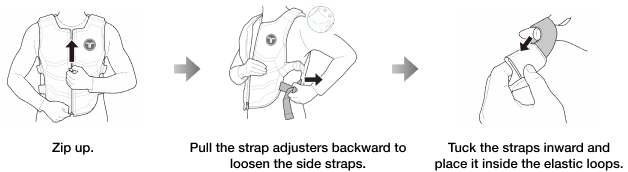
The side straps on the TactSuit Pro can be adjusted to ensure the vest fits comfortably and stays secure during use. You can easily loosen or tighten the straps depending on your preference.
For a more relaxed fit
- Remove the side straps from the elastic loops.
- Pull the strap adjusters backward to loosen the straps.
- Tuck away the remaining straps by securing them with the elastic loops.
- Optional: Attach extended side straps (available on our online shop) for a looser fit.
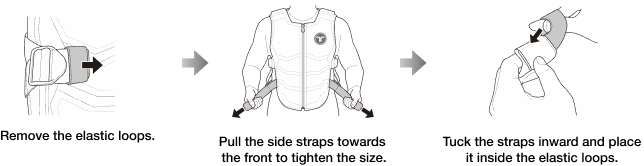
For a tighter fit
- Remove the side straps from the elastic loops.
- Pull the side straps forward to tighten.
- Use the elastic loops to secure any leftover strap.
Adjust Length of TactSuit Pro
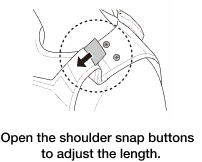
The TactSuit Pro features adjustable shoulder snap buttons that allow you to change the overall length of the vest.
To make the vest longer
- Open the shoulder snap buttons.
- Gently pull the TactSuit Pro downward to adjust the fit.
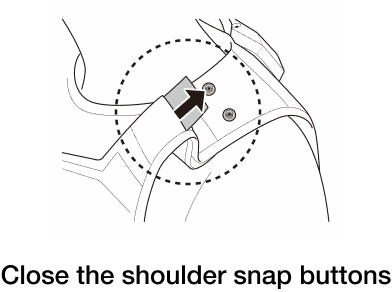
To return to the original length
- Neatly arrange the internal cables inside the shoulder section.
- Close the snap buttons.
Was this article helpful?
That’s Great!
Thank you for your feedback
Sorry! We couldn't be helpful
Thank you for your feedback
Feedback sent
We appreciate your effort and will try to fix the article
Still have problems?
If you couldn’t find what you were looking for, feel free to contact our support team.