You can lock the front power button of your TactSuit Pro to prevent accidentally turning it off during gameplay. The back power button will remain functional. Once the Button Lock option is enabled, the front button will not respond until the lock is disabled.
Locking on Windows PC
Open bHaptics Player for PC and pair your TactSuit Pro.
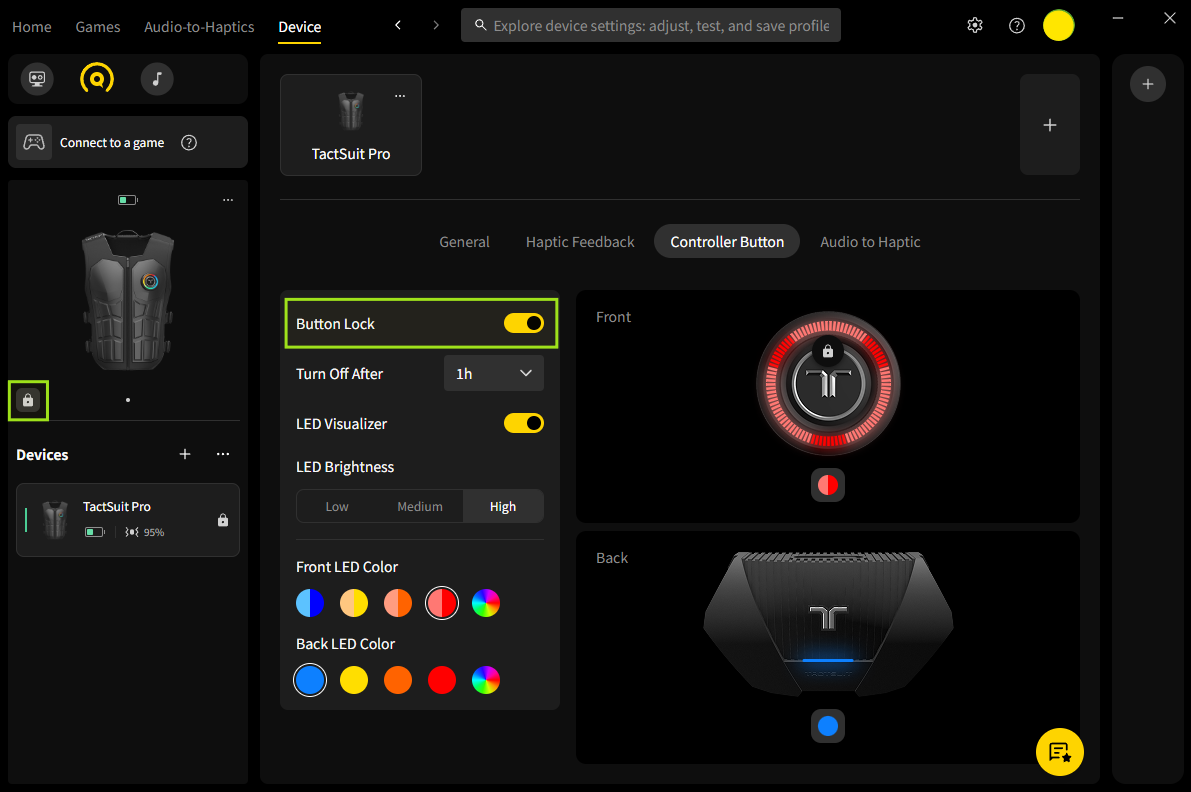
Go to the Device tab and select Controller Button
Enable the Button Lock toggle.
After locking, a lock icon will appear next to the device icon.
To unlock, click the lock icon in the Device panel, or disable the toggle in the Controller Button settings. The front power button will function normally again.
Was this article helpful?
That’s Great!
Thank you for your feedback
Sorry! We couldn't be helpful
Thank you for your feedback
Feedback sent
We appreciate your effort and will try to fix the article
Still have problems?
If you couldn’t find what you were looking for, feel free to contact our support team.