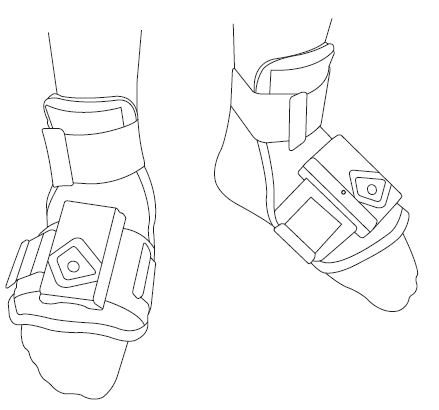
To experience optimal haptic feedback, put on the Tactosy for Feet and fit it securely to your feet by following the steps below.
QUICK OVERVIEW
Wearing the Device
- Loosen all straps by detaching the Velcro and place the device on top of your foot.
- Secure the straps around your foot and fasten with Velcro.
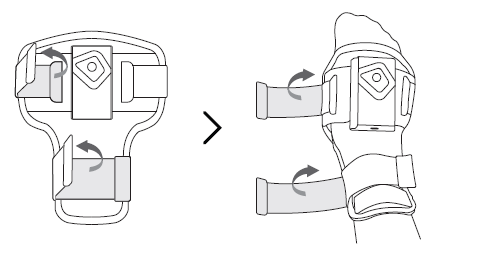
- Secure the straps around your foot and fasten with Velcro.
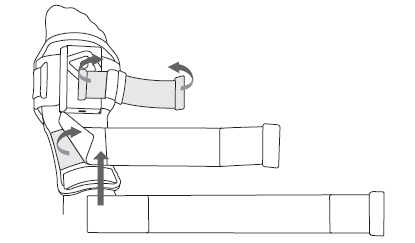
- Adjust the foot strap as needed: extend or shorten by folding one end of the strap and attaching it to the Velcro.
>
Attaching a Vive Tracker (Optional)
If necessary, you can attach a Vive tracker to the Tactosy for Feet to use them together.
⚠️ Vive tracker is not included
Steps to Attach a Vive Tracker
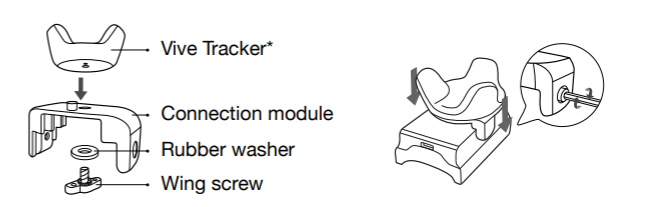
- Fasten the Vive tracker to the connection module using the provided rubber washer and wing screw.
- Make sure the holes on the tracker and connection module are aligned before fastening.
- Place the connection module on top of the Main Controller of the Tactosy for Feet and secure it with the wrench bolts.
Was this article helpful?
That’s Great!
Thank you for your feedback
Sorry! We couldn't be helpful
Thank you for your feedback
Feedback sent
We appreciate your effort and will try to fix the article
Still have problems?
If you couldn’t find what you were looking for, feel free to contact our support team.